


By Álvaro ArrescurrenagaCEO of Voicit
What's new at Voicit this quarter? We activate in general Plan Mode, the new eight-stage reporting engine; we launched integration with Viterbit ATS to upload interview reports as structured notes to the candidate's file; we redesigned the competency assessment as a standalone document with new graphics and PDFs; and we launched a panel of Individual metrics per team member for administrators.
- Plan Mode — reporting engine structured in 8 phases (planning, auditing, granular extraction…) with Pro and Lite versions.
- Integration with Viterbit ATS — send interview reports as notes on the candidate's profile with one click.
- Redesigned competency assessment — separate document, new graphic and readable PDF.
- Metrics per team member — Monthly dashboard for administrators + Exportable Excel file.
This post summarizes the closing of the first quarter of 2026 with the details that didn't fit in the news email: exactly what changes, who it affects, and how to activate each piece.
Table of contents
Plan Mode: the new 8-phase reporting engine
What it was like before. The system extracted information from each source document, formatted it, and translated it into a direct flow.
What changes. Plan Mode introduces a structured process that adds planning and auditing steps to achieve results significantly more accurateespecially when combining several documents as sources:
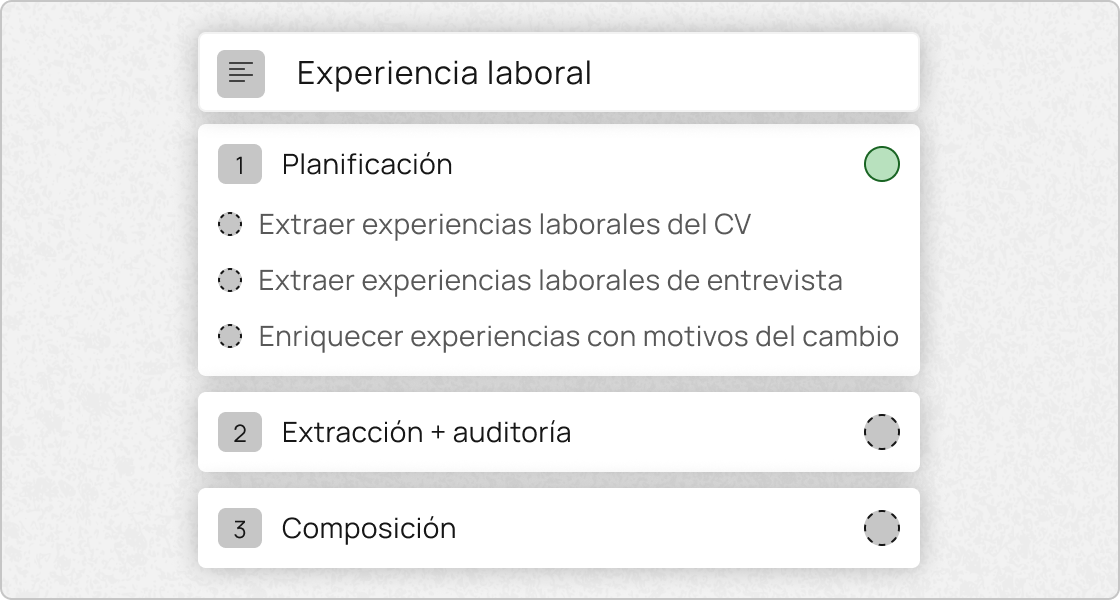
Two versions according to the plan. Plan Mode is generally activated with two configurations:
- Pro version — HR plan, more advanced AI models available.
- Lite version — other users, models optimized for efficiency and cost.
References in the report. Reports generated with Plan Mode now include references to the documents used in the different parts of the content, which provides traceability and transparency to each paragraph.
The process is slower than the previous flow, but significantly more accurate. Therefore, it is activated gradually while its behavior is monitored.
Integration with Viterbit ATS
It is now possible to connect Voicit with Viterbit and send the interview reports directly as structured notes in the candidate's file, with a single click from the meeting's side menu.
How candidate identification works
The search is done by email, which acts as a unique identifier:
- If the candidate does not have an email registered on Voicit, the platform asks for it at that moment and links the profile automatically.
- If Viterbit returns multiple matches, the user chooses the correct candidate before submission.
Configuration and security
The integration is configured only once at team level by an administrator; Voicit licenses remain individual per user (each consultant needs their own license). Viterbit credentials are stored encrypted at rest and they are never displayed on the Voicit interface.
Why it matters
Even if the process doesn't move forward with the candidate, a complete record of the interview remains within the ATS, providing traceability for the recruitment team. All existing Voicit functionalities—meeting chat, analytics, report editing—remain unchanged: this integration It adds a bridge with Viterbit, but does not replace any part of the current flow..
Redesigned competency assessment
We have redesigned the skills assessment to add more value and less noise to the main report:
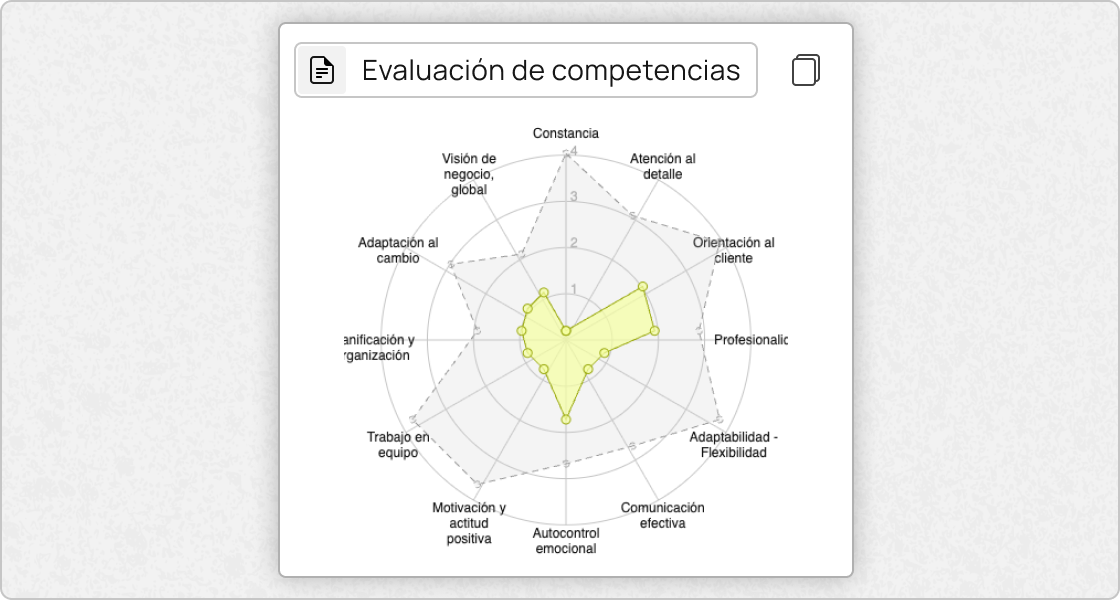
- Independent document. Competency assessment is no longer included within the interview report: it is generated as a separate document, accessible like any other and usable as context in other customized sections.
- New graphics. A graph has been incorporated that allows the candidate's level in the assessed competencies to be visualized at a glance.
- Redesigned PDF. The exportable PDF has a more readable and structured format (previously it was completely flat), designed for easy sharing with clients.
- Activation from template. A button appears in the templates. "Add skills report" from which the competencies to be assessed are manually entered or activated automatic detection.
The result: a shorter, cleaner interview report, with a skills assessment that is accessible when needed and reusable as input in customized sections.
Team metrics by member
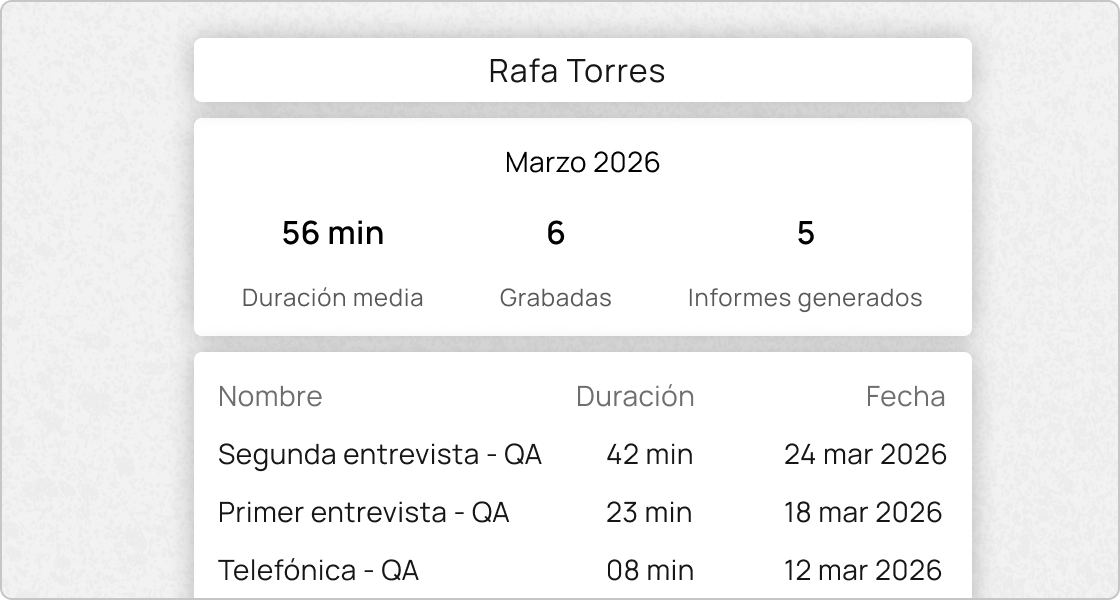
We're launching a new panel of Individual metrics per member and month with:
- Average meeting duration.
- Number of meetings recorded and processed.
- Detailed table with name, duration, status and date of each meeting of the month.
Redesigned Excel export. The export now combines individual and team metrics into one format Ready to share with management or use in internal reviewswithout needing to make manual visual adjustments.
Objective: To give administrators real visibility into Voicit usage at the team level and facilitate the tracking of activity month by month.
Frequently Asked Questions
How to integrate Viterbit with Voicit?
A team administrator activates the integration once from the Voicit integrations section by entering the Viterbit credentials, which are stored encrypted at rest. From then on, any licensed user can send an interview report as a structured note to the candidate's profile from the meeting's sidebar menu.
Candidate identification is done via email: if there's no exact match in Viterbit, Voicit requests the information immediately or allows the candidate to choose from multiple matches. It doesn't replace the Applicant Tracking System (ATS), but rather complements it: it adds complete traceability of the interview even if the process doesn't progress.
What is Plan Mode and why does it make reports more accurate in Voicit?
Plan Mode is Voicit's new reporting engine, structured in eight phases: planning, plan review, accurate extraction, fidelity audit, phase dependencies, formatting, translation, and final composition. Unlike the previous direct workflow, it adds verification steps between each phase, increasing the report's fidelity to the sources.
The increase in accuracy is most noticeable when multiple source documents are combined (minutes + notes + recording), because the fidelity audit prevents the AI from mixing or extrapolating information between them. It is enabled by default in two versions: Pro (HR plan, advanced models) and Lite (all other users).
How to assess a candidate's skills in an interview with Voicit?
From the interview template, press "Add skills report" and manually enter the competencies to be assessed, or activate the automatic detection so that Voicit can suggest them based on the context. After processing the meeting, the evaluation is generated as a separate document from the main report, with a graph of the candidate's level and a redesigned, exportable PDF.
The competency document can also be used as context in other customized sections of the report, allowing the analysis to be reused without having to repeat it in each template.
How do I export team metrics from Voicit to Excel?
Administrators access the team metrics dashboard from the space settings, choose the month to export, and press "Export to Excel"The generated file combines individual metrics per member—average duration, number of meetings recorded and processed, detailed table with name, duration, status, and date—along with the aggregated team view.
The format is redesigned to be directly shareable with management or used in internal reviews without having to be manually reformatted.
Does Voicit integrate with Microsoft Teams?
Yes. For users with active integration, Voicit Automatically imports Teams meetings every 15 minutes and processes those from the last 6 hours, notifying you by email when they are ready. There is also a button "Import Teams meeting" visible in the repository to manually bring up any specific meeting.
Participant detection in Teams has been improved with AI so that names appear correctly assigned in the report without manual intervention.
CEO and co-founder of Voicit. He works with recruitment consultancies and teams that document interviews and meetings using AI.