Voicit Go

Record everything.Remember everything.The AI-powered call and meeting recorder

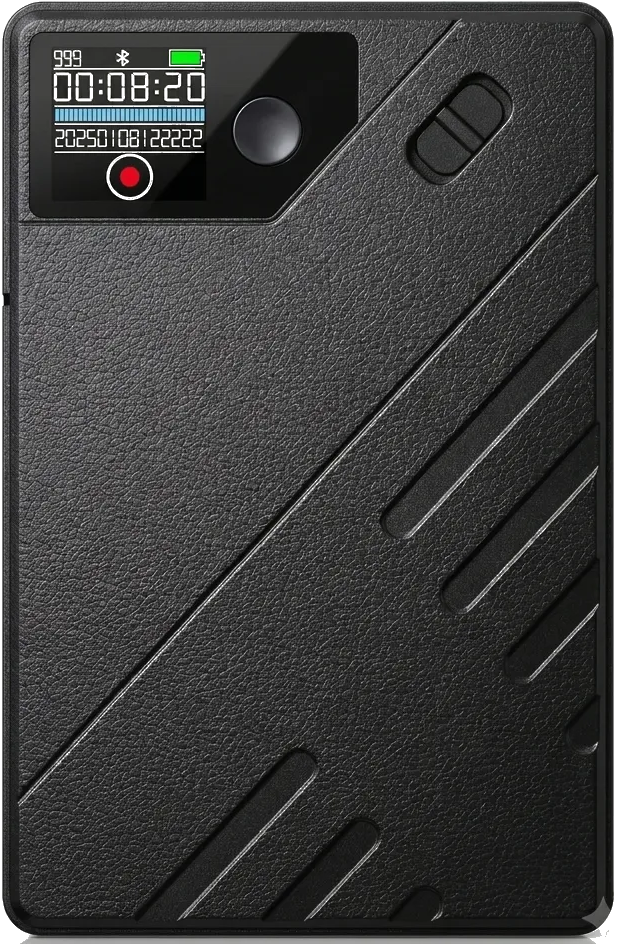
Voicit Go is an ultra-thin voice recorder that records phone calls, interviews, and in-person meetings without apps or your mobile device. It includes a 1-month subscription to Voicit Pro, so every recording is returned as a transcript and report.

Voicit Go call and meeting recorder, front view

Every call and every meeting holds decisions, figures, and agreements.Voicit Go makes sure that none are missed.

0h
recording
0h
per load
0GB
from memory
0g
of weight
Design

A recorder of just 7.80 mm.

Thinner than your iPhone. So light you forget you're carrying it.

Profile of an iPhone, 8.25 mm thick
Voicit Go recorder, 7.80 mm thick, thinner than an iPhone
0,00 mm iPhone
0,00 mm Voicit Go
A magnet. That's it.

It attaches to the mobile phone.
to record calls.

Attach Voicit Go to the back of your phone and record your calls crystal clear: on an iPhone with MagSafe it attaches directly and on Android, with the included magnetic ring. Having a face-to-face meeting? Leave it on the table and capture the entire room.
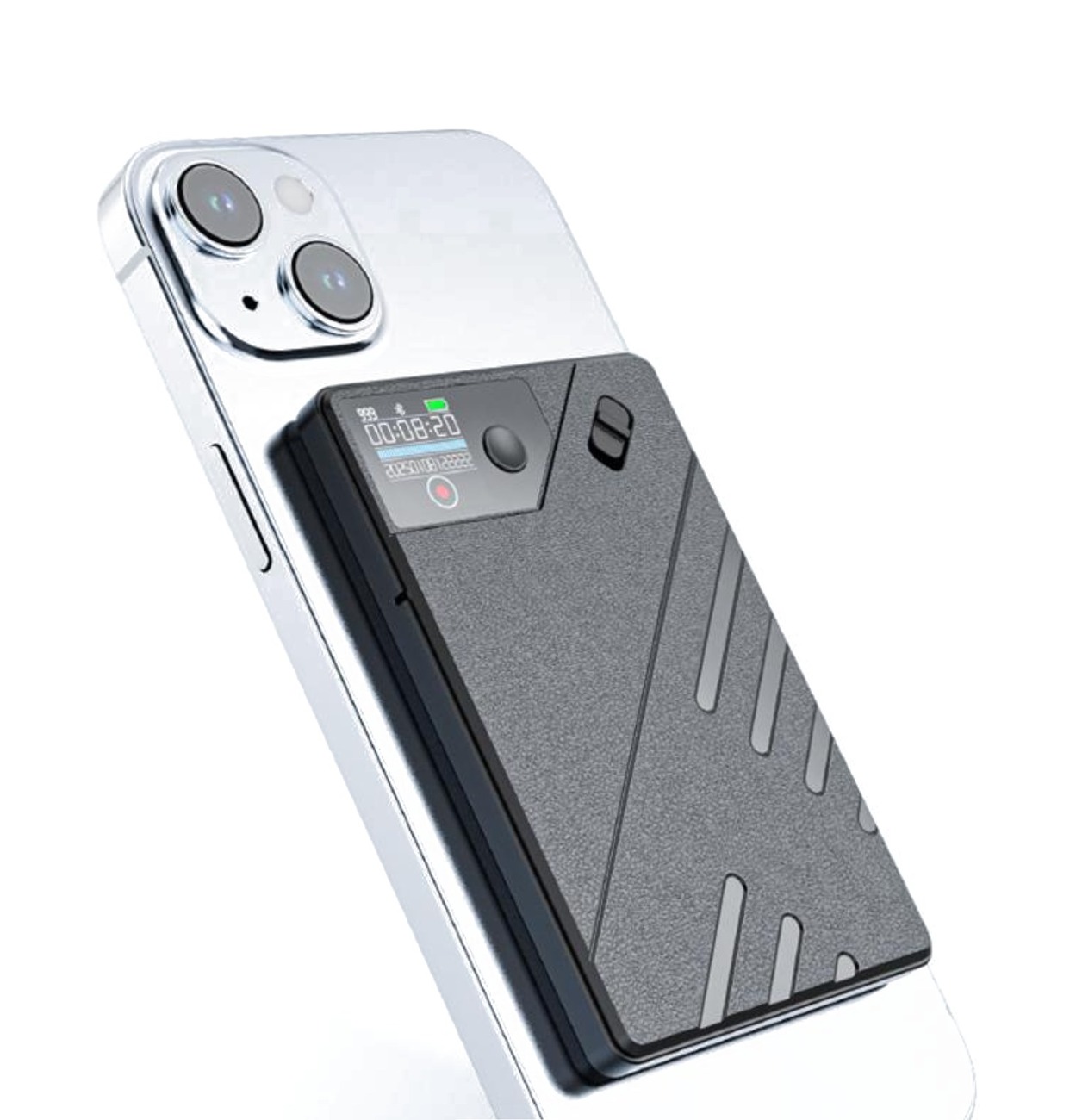
iPhone and Android Magnetic ring included Without bots or intrusive apps
Voicit Go magnetically attached to the back of an iPhone
Without depending on the phone

Your mobile phone is still yours.

The recording is handled by Voicit Go, not your phone. Reply to a message, check your contacts, or look up information mid-conversation: the recorder keeps going, uninterrupted, without any apps open, and without taking up your screen.

What's said is lost, does that sound familiar?

The calls are carried away by the wind.

You hang up and all that remains is your memory. The data, the figures, and the commitments fade away in a matter of hours.

In-person meetings leave no trace

Without a record, what was agreed upon ends up depending on what each person remembers.

Taking notes takes you out of the conversation.

While you're writing, you stop listening. And yet you miss the nuances that truly matter.

How it works: from conversation to report with AI

STEP 1

Record

Slide the switch and record, even with the recorder turned off. Calls, phone interviews and face-to-face meetings. No apps, no need to connect it to anything.

STEP 2

Process with Voicit

Connect the recorder via USB and upload the file .ops Exactly. Voicit processes it: it transcribes with over 95% accuracy and differentiates each participant.

STEP 3

Report ready

Voicit summarizes the conversation and generates a report in your format: agreements, tasks, and key moments.
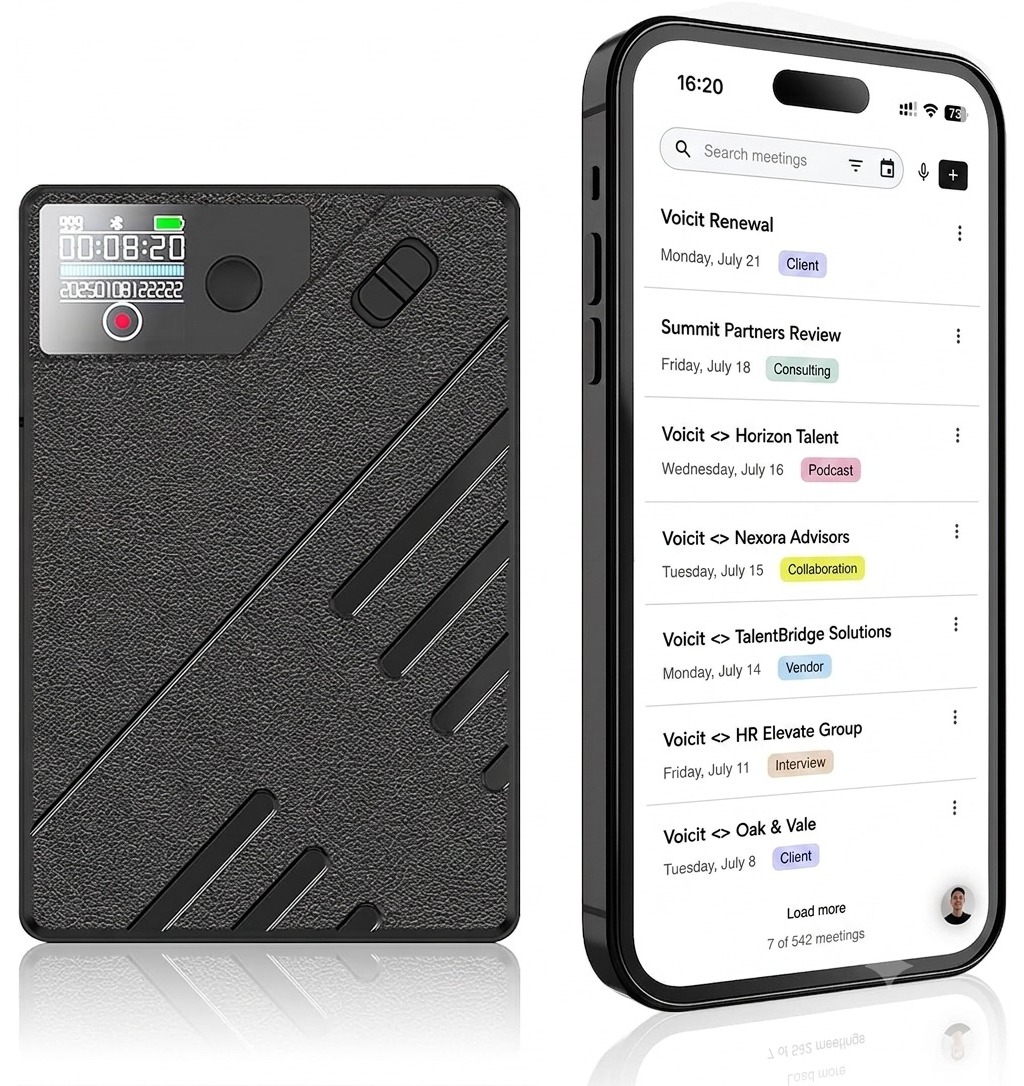
00:08:20
2025·01·08 · 12:22
REC
Voicit Go recorder along with the Voicit app for meetings
✦ Report generated

Meeting · Nexora Client

Jan 8 · 42 min · 3 participants

Summary
Agreements and tasks
Submit revised proposal before Friday
Finalize the pilot's budget at €25,000
Next meeting: January 22
STEP 1

Record

Slide the switch and record, even with the recorder turned off. Calls, phone interviews and face-to-face meetings. No apps, no need to connect it to anything.

00:08:20
2025·01·08 · 12:22
REC
STEP 2

Process with Voicit

Connect the recorder via USB and upload the file .ops Exactly. Voicit processes it: it transcribes with over 95% accuracy and differentiates each participant.

Voicit Go recorder along with the Voicit app
STEP 3

Report ready

Voicit summarizes the conversation and generates a report in your format: agreements, tasks, and key moments.

✦ Report generated

Meeting · Nexora Client

Jan 8 · 42 min · 3 participants

Summary
Agreements and tasks
Submit revised proposal before Friday
Finalize the pilot's budget at €25,000
Watch it in 30 seconds

How to record a call and upload it to Voicit

1 Attach it to your mobile phone 2 Flip the switch up when the call starts 3 Connect it to the PC and upload the .ops to Voicit
Two ways to use it

What it's for: recording calls and face-to-face meetings

For your calls

Attached magnetically to the back of your phone, it records your calls clearly: to record a call, it has to be attached to the phone. The audio is saved on the recorder, ready for processing.
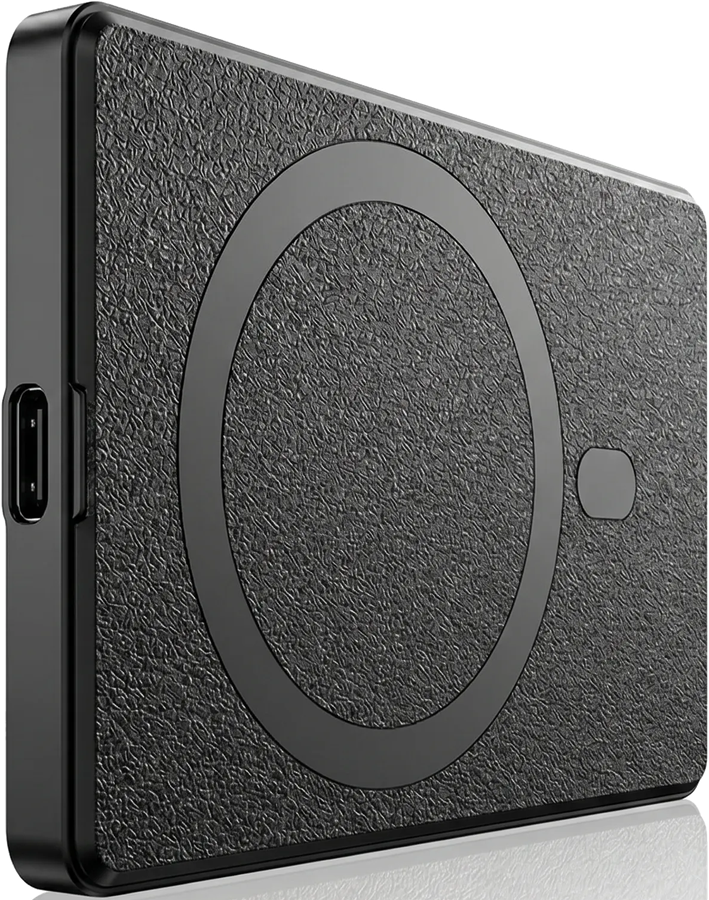
Back of the Voicit Go recorder with the magnetic ring

For your meetings

On the table, it captures all participants in a face-to-face meeting with clarity, even from several meters away.

Voicit Go recorder on a meeting table
Technical specifications

Technical specifications of the Voicit Go recorder

Recording
68 h20 hours per charge
Memory
8 GBfor about 68 h of audio
Format
.opsOpus audio · Voicit converts it to MP3
Screen
Integratedreal-time monitoring
Control
Switch and buttonrecords with one flick · pauses and resumes
Connection
USB-C
Compatibility
iPhone and AndroidMagSafe or magnetic ring
Size and weight
8.6 × 5.4 × 0.8 cm54 g
In the box
Cable, ring and guideUSB-C to USB-A, magnetic ring and quick start guide
What's in the box

What's included in the Voicit Go box

Voicit Go Recorder

Voicit Go

Ultra-thin recorder · 68 h of recording
USB-C charging cable

USB-C cable

USB-C to USB-A, to charge it and transfer your recordings

Magnetic ring

Magnetic ring

To attach it to Android phones, to phones without MagSafe or to your case

Security by design

The audio won't go anywhere until you take it.

Most AI-powered recorders upload your recordings as soon as you finish. Voicit Go doesn't upload anything: it saves the audio to its memory and it stays there until you connect it via USB and decide what to upload. One path, one responsibility: you.

  1. You record

    You press a button and it starts recording. No apps, no pairing, and no permissions required.

  2. The audio stays inside

    The tour ends here until you decide otherwise. There is no automatic exit: the recording is saved in the Voicit Go's memory and remains there.

    Third-party recorder

    At this point the audio would have already left the device on its own, to be processed somewhere you can't see.

    ? → ? → ?
  3. You connect it via USB and choose what to upload

    The audio only comes out because you create it, and only the audio you choose comes out.

    USB → Voicit
  4. Voicit transcribes it and gives you the report

    You go up the .ops and Voicit returns the transcript with the participants differentiated, the report and the audio in MP3.

Four steps you can name. None of them happen without you.

What that means for you

No automatic exit

It doesn't connect to the internet or sync in the background. What you record stays in its 8 GB until you move it.

You can still change your mind

Once uploaded, it cannot be un-uploaded. As long as you don't connect it, you can listen to the recording, keep it, or delete it.

You know where it's been.

From the recorder, via a cable, to Voicit. If you have to explain how that conversation went, the answer fits in one sentence.

You don't have to take our word for it

We're not asking you to trust our privacy policy. As long as the recorder is in your pocket, you don't need to trust anyone.

What happens when the audio is already in Voicit is what comes right below.

Privacy and security

Your conversations, with European security standards.

European storage

Your recordings are stored in data centers in the European Union, with European security and storage standards.

Always encrypted

In transit and at rest: your conversations travel and are stored encrypted.

Your voice doesn't train AI

Your conversations are used only to generate your transcript and report. Never to train models.

GDPR standard

Voicit acts as the data processor pursuant to Article 28 of the GDPR.

Spanish company · Support in 7 languages: Spanish, English, French, German, Italian, Portuguese and Catalan
View security and supplier details →

Who already uses it

Fewer notes. More presence.

★★★★★ 4,8 • +350 reviews of the Voicit app on the Chrome Web Store ↗
We conduct many initial phone interviews, and before, I only recorded what I had time to jot down. Now I record them, and the candidate report includes everything: experience, motivation, and availability.

Cristina Riubrogent Cristina RiubrogentRecruiting Business Leader · EmpatifHR Consulting
I was looking for a solution like Plaud, but one that would allow me to use my mobile phone during the meeting and with the data stored in Europe, not in the United States.

Guy Madec Guy MadecVoicit Go CustomerMeetings and work calls

A change you'll notice

Before

Without Voicit Go

  • Phone calls and interviews are not recorded.
  • In-person meetings without minutes
  • You take notes by hand and you miss things
  • You reconstruct the agreements from memory
Now

With Voicit Go

  • Every call and every interview, recorded and saved
  • Every in-person meeting, captured
  • You are present, without writing anything
  • Report with agreements and tasks at the moment

Don't let a single word slip through your fingers.

Start documenting every call and every meeting with Voicit Go.

From €25 with the annual Pro plan · Shipping included
How to get it

Voicit Go price: €49.99, with 1 free month of Voicit Pro

Recommended

Voicit Go + Voicit Pro

The recorder, and the AI that turns each conversation into a report.

Voicit Go €49.99€25.00
Voicit Pro €18 /user per month
Buy with annual Voicit Pro

Annual payment · You save €24.99 on the recorder. VAT not included.

  • What's included in Voicit Pro?
  • Transcription unlimited
    • For online, face-to-face, and telephone conversations
    • Over 95% accuracy
    • Participant voice differentiation
  • AI in conversations
    • AI Reports: 100% Customized
    • AI Chat: Ask questions and get more information about each conversation
  • AI Agent expert in reports
  • Learn more about Voicit Pro

Free shipping to over 50 countries in Europe, Latin America and other markets.

Frequently Asked Questions

Frequently asked questions about the Voicit Go recorder

Do I need a Voicit subscription to use the recorder?
Not for recording: Voicit Go records on its own, no apps. To transcribe the recording and generate reports you need Voicit, which is why each recorder includes 1 free month of Voicit ProUnlimited conversations: today you only pay for the recorder, and after the first month, the plan is €24/month. You can cancel anytime from your account, with no commitment. If you're already a Voicit customer, you'll continue with your existing plan: no new subscription will be created for you.
Is it cheaper if I buy it with the Voicit Pro plan?
Yes. With the annual Pro plan the recorder costs €25.00 Instead of €49.99: you save almost half. With the monthly Pro plan, the recorder maintains its price of €49.99. You can choose either option when purchasing.
How do I transfer the recording to Voicit?
You connect the recorder to your computer via USB-C, open the drive as you would a USB flash drive and, in app.voicit.com, click “Record or upload audio” and upload the .ops file as is, without converting anything. Voicit processes it: it transcribes it, identifies the participants, generates the report in your format and also gives you the audio in MP3.
What is the .ops format and why can't my computer open it?
El .ops It's audio Opus The compressed voice codec allows 68 hours of conversation to fit into 8 GB. As the recorder writes it, it doesn't have the packaging that VLC or Windows Media Player expect, so double-clicking doesn't produce sound. No problem: upload it to Voicit and the platform will decode it.
Can I keep the audio in a normal format?
Yes. When processing the recording, Voicit converts the .ops a MP3In addition to providing you with the transcript and report, this gives you the conversation in a standard format that any media player can open, and which you can archive or share.
In which languages does transcription work?
Voicit transcribes in Spanish, English, Basque, Catalan, French, German, Italian and PortugueseYou record the conversation with Voicit Go on any of them and, when processing the audio in Voicit, you choose the language of the transcript and the report.
Does it record phone calls?
Yes. Attach Voicit Go magnetically to the back of your phone and record the call clearly, without apps or bots. On an iPhone with MagSafe it attaches directly; on Android, stick the included magnetic ring on first. To record calls, it has to be attached to the phone.
Do I need to put the call on speakerphone for it to record properly?
No. Voicit Go captures the two voices —yours and the person you're talking to— even if you're holding the phone to your ear normally. You don't need a hands-free device or speakerphone.
What about in-person meetings?
Also. Leave it on the table and it will capture all participants in a face-to-face meeting, even from several meters away.
How much battery and memory does it have?
Up to 20 hours of recording per charge, and 8 GB of memory for about 68 hours of audio.
How do I charge it?
With the included USB-C cable and an adapter of no more than 5 V and 1 A. Don't use fast chargers (9 V): they can damage the recorder. While it charges, the red light blinks; when it's done, the blue light stays on.
What do I do if the recorder doesn't respond?
Press and hold the button for 15 seconds to restart it.
Does the price include shipping? To which countries?
Yes, shipping is included in the price. We ship to over 50 countries in Europe, Latin America, and other markets. We do not ship to the Canary Islands, Ceuta, Melilla, or some countries with customs restrictions.
How tall and how much does it weigh?
It measures 8.6 × 5.4 × 0.8 cm (7.80 mm thick) and weighs only 54 g. It fits in any pocket.
Is it legal to record a phone call in Spain?
Yes, as long as you are one of the participants in the conversation. Article 197 of the Penal Code Recording other people's conversations in which you are not involved is prohibited, but not recording your own. Even so, in professional contexts it is advisable to inform the other party that you are recording and, if you are going to process personal data, to inform them in accordance with the GDPR.
Where are my recordings stored?
In data centers within the European Unionencrypted in transit and at rest, and processed in accordance with the GDPR. You can find details of the measures and providers in our security page.
Are my conversations being used to train AI?
No. Your conversations are used only to generate your transcript and report. They are never used to train AI models.
How do I record a call on my iPhone if iOS doesn't allow it?
iOS doesn't let you record calls with third-party apps. Voicit Go solves this with hardware: it attaches magnetically to the back of the iPhone (directly with MagSafe; otherwise, with the included magnetic ring) and records the conversation externally, with no apps, no permissions, and no jailbreak. It works the same with Android and with hands-free calls from WhatsApp, Teams or Meet.
Does it work with Android and landline phones?
Yes. Voicit Go records on its own, so it doesn't depend on the operating system: it works with iPhone and with any Android. On an iPhone with MagSafe it attaches directly by magnet; on Android, first stick the included magnetic ring on the back of your phone. With a landline, put it on hands-free and leave the recorder next to it.
Does it work with a case?
Yes, as long as the case has MagSafe or a magnetic ring. If it doesn't, stick the included magnetic ring on the back of the case and the recorder will attach to it magnetically.
Does it need internet, Bluetooth, or an app to record?
No. Voicit Go records on its own: it doesn't need internet, and there's nothing to pair it with and no app to install. You slide the switch and it records. Internet only comes into play afterwards, when you connect the recorder via USB and upload the audio to Voicit.
Does the recorder upload anything on its own?
No. Voicit Go doesn't connect to the internet, and there's no app that syncs in the background. It records to its internal memory, and the audio stays there until you connect the recorder via USB to your computer or mobile device and decide which file to upload to Voicit.
Can I delete a recording before uploading it?
Yes, and that's one of the advantages of it not uploading anything automatically. As long as you don't connect the recorder, that conversation hasn't left your pocket: you can review it and delete it without it ever reaching any server.
What happens if I lose the recorder?
Treat it like you would a USB drive with work information: whoever finds it can plug it in and listen to what's on it. That's why we recommend uploading the recordings to Voicit and deleting them from the device once you've processed them.
Do I need to install anything on the company computer?
No. Voicit Go connects via USB and appears as just another drive, without requiring any drivers or software. You upload the file to Voicit from your web browser, so it doesn't access the company network or need permission from the IT department.
Can I upload recordings from my phone?
Yes, if your phone can connect to the recorder via USB. The easiest option is a computer: connect it with the included cable and upload the recording in app.voicit.com.
Does it work as a recorder for job interviews?
Yes, that's one of its main uses. Recruiters conducting initial phone interviews record the call and later obtain a report on the candidate's experience, motivation, and availability.
Can it be used as a voice recorder for voice notes?
Yes. It records in .ops with 8 GB of memory for about 68 hours of audio, so it works as a digital dictaphone for voice notes, as well as for calls and meetings. When you upload the note to Voicit, you get the transcript and the audio in MP3 format.